Fall 2015 CSc 308 Homework Assignments
Homework #1 - Learning
NetBeans
We will be using the NetBeans IDE for Java development in CPE
308 this quarter. NetBeans 7.3.1 is available on the
lab workstations. You may also want to install it on your
personal computer. (Do NOT use NetBeans 8+).
Visit NetBeans Docs
and Support site. There are many screencasts, tutorials,
and articles. I suggest the "General Java Development" learning
trail, and from there the Java Quick Start Tutorial takes only
10 minutes. After that, Developing General Java Applications
tutorial takes about 30 minutes.
Complete this Java
review activity using NetBeans
Homework #2 - Practice with Trac.
Prerequisites: Your team change manager must have completed the Trac
SiteSetup
directions.
The Project
Overview mandates that each student keep track of their
project time. Create a ticket for yourself on your team Trac
reminding yourself to submit your time
log for week 1 to the team manager. Click "View Tickets"
and select an appropriate report for viewing. Complete the
task. Close the Trac ticket. View the report again.
Browse to the Sandbox page for your team wiki, e.g.
http://calpoly.repositoryhosting.com/calpoly_teamname/wiki/SandBox
Create an entry for yourself like this
example. Refer to the guide on WikiFormatting,
use
a heading, bold, monospace, a hyperlink, a list, a trac link to a
ticket, and escaping WikiPageNames. Don't forget to add
a comment when you submit the page.
Create a new topic in your Trac discussion forum. Add yourself
as a subscriber and be sure you receive an email notification.
Homework #3
The purpose of this assignment is for you to familiarize yourself
with the game that you will build for the team project.
Browse the problem
statement page. Read the game
rules.
Together with the other members of your group, create a deck of Clue
Cards. There are 39 Action cards, 21 Clue Cards, and 10
destination markers. Obviously, it's best to divide up the
work of creating the cards (simple hand lettered 3x5 cards are
adequate).
Play one or more complete games. Be sure everyone has a thorough
understanding of the game rules.
Take a digital photo of the final table with everyone's cards
displayed. Add the photo to your Trac Wiki site under
"Developer Resources".
Read the Optional features in the problem statement and brainstorm
any additional features you think would make a cool game.
You may want to do some "market research" and see if there is any
competition for our intended product. Do a web search
for online (or mobile) clue-style games. Consider the features
and style of play compared to ours and note any aspects we should
include to be more competitive. (There is nothing to submit).
Homework #4
Complete the SimSE
assignment.
Homework #5
Write a Use Case for the procedure for enrolling in a course with
PASS at Cal Poly.
Homework #6
Follow the directions for this
assignment.
Homework #7
Spend not more than 30 minutes studying this
student prototype for an interactive mystery game (based on
"Clue"). Despite some similarities, this prototype is NOT AN
EXAMPLE of this quarter's project. Write a one page critique
of the prototype, referring to these
criteria. You may use a list format instead of an essay. List
what was done well and what needs improvement. Rank your issues in
terms of severity.
Homework #8
Complete the Working
with Subversion in NetBeans activity (Pizza Order
International). There is no written submission for this homework.
Homework #9
Created by team designer.
Homework #10
Part 1. Draw a UML class diagram to show these classes
and their relationships. Your diagram may be neatly
hand drawn, or you may use a software tool.
Part 2. Draw a UML Class Diagram showing the relationships
for these entities:
MusicPlayer, CD player, iPod, Band, guitarist, drummer, drumset,
guitar, lead guitarist, rhythm guitarist, bass guitarist, song,
playlist
You may list any assumptions you make about the relationships.
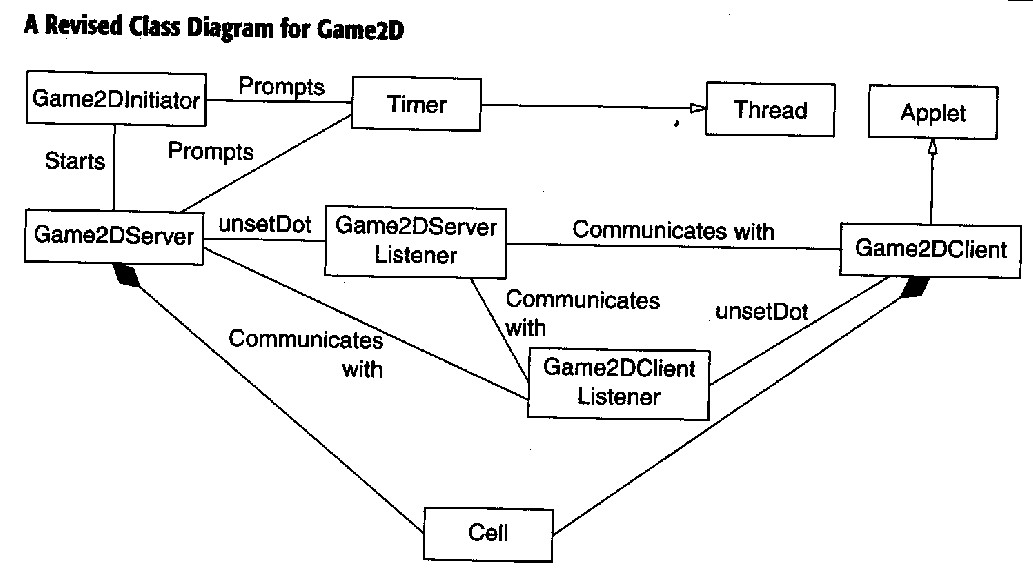
Part 3. Imagine a simple two player internet game called Game2D
with these
features. Write a list of errors in this preliminary class
diagram for Game2D. List the errors you identify ranked from
most severe to least severe.